
Explain and Send Screenshots
by Jason Savard
Screenshots
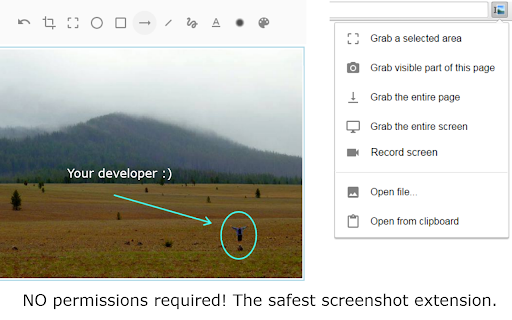

Capture or record a video of your screen, write text or arrows and share it. The safest extension with NO crazy permissions!
Description
Capture or record a video of your screen, write text or arrows and share it. The safest extension with NO crazy permissions!
✨ A Secure Screen Capture & Annotation Tool to Capture, record, annotate, and share your screen— all with unmatched privacy and speed. 🛡️ Why The Extension is the Safest Choice Stop compromising your security for basic screen tools. As an experienced developer, I built this extension to delivers the same robust features without requesting invasive "read and change all your data" permissions found in every other popular screenshot extension. 🚀 Core Features & Capabilities Quick Capture: Take a full or partial snapshot of any webpage or active window instantly. Screen Recording: Record a video of your screen and include audio narration via your microphone. Intuitive Editor: Use the built-in, clean editor to: Annotate: Draw arrows, circles, and lines to highlight key information. Edit: Add text, crop, erase, or delete selections. Privacy: Blur sensitive areas to protect information. AI Background Removal: Remove and substitute image backgrounds right on your device (done locally with AI). 📤 Seamless Sharing & Workflow Sharing your annotated image or video is simple and flexible: Direct Link Sharing: Get a direct cloud link for instant sharing on social media (Facebook, X/Twitter) or in chat apps. Quick Copy/Paste: Copy the image to the clipboard to easily paste it directly into emails (Gmail, Outlook, etc.) or documents. Cloud Integration: Supports "Save to Google Drive." Local Download: Download the image directly to your desktop. ⚙️ Power User Accessibility Customize your experience for maximum efficiency: Assign Shortcut Keys for lightning-fast captures. Use the Right-click Context Menu for quick screen capture options. Extra features are unlocked for contributors who support my safe development philosophy. Give it a try and see the difference a secure, powerful tool makes! Changelog: https://jasonsavard.com/wiki/Explain_and_Send_Screenshots_changelog
4.2 out of 5
Related Extensions

InstaText
InstaText
Write like a native speaker.

WEB.DE MailCheck
1&1 Mail & Media GmbH
Der sichere Klick in Dein Postfach.

ScreenPal - Screen Recorder & Video Editor
ScreenPal
Record your screen & webcam, take screenshots, edit videos & images - easy & free!

WPS PDF - Read, Edit, Fill, Convert, and AI Chat PDF with Ease
www.wps.com
Easy-to-use PDF tools to view, edit, convert, fill, e-sign PDF files, and more in your browser.

AnyDoc Translator - Translate Web and PDF
www.wps.com
The ultimate AI translator for web, files, ebooks, academic papers, images, and text

IE Tab
Blackfish Software, LLC
Display web pages using IE within Chrome. Use Java, Silverlight, ActiveX, Sharepoint, and more.